 Good Thursday to all! Today I want to talk about linking zazzle into our lenses.
If you were following my blog posts a few months ago, you would have seen where I asked how others were highlighting one of their zazzle products at a time. Zazzle doesn't allow you to right click and save images.
I wanted to make a lens highlighting the postage I had created. The answers that I got was to print screen, then edit that down to just the stamp. That is what I did, then linked the photo to my product.
Thanks to Virginia's updating challenge, I learned that there is a link button under the product picture. When you click that you set up the code and put that into the html box in the text module or guestbook module etc. Is this new?? I'm thinking it has to be pretty new, or other webmasters would have told me to do this when I was asking way back when.
I have completely re-done my zazzle postage lens (which I will link up in the linky) as well as I am having a blast searching zazzle for products related to each lens and adding that to the guestbook.
I would have had no idea at all that doing so automatically puts in our associate code, so if someone sees that design and loves it----and clicks over from the image that we receive a referral fee---even if it's not our own product.
Good Thursday to all! Today I want to talk about linking zazzle into our lenses.
If you were following my blog posts a few months ago, you would have seen where I asked how others were highlighting one of their zazzle products at a time. Zazzle doesn't allow you to right click and save images.
I wanted to make a lens highlighting the postage I had created. The answers that I got was to print screen, then edit that down to just the stamp. That is what I did, then linked the photo to my product.
Thanks to Virginia's updating challenge, I learned that there is a link button under the product picture. When you click that you set up the code and put that into the html box in the text module or guestbook module etc. Is this new?? I'm thinking it has to be pretty new, or other webmasters would have told me to do this when I was asking way back when.
I have completely re-done my zazzle postage lens (which I will link up in the linky) as well as I am having a blast searching zazzle for products related to each lens and adding that to the guestbook.
I would have had no idea at all that doing so automatically puts in our associate code, so if someone sees that design and loves it----and clicks over from the image that we receive a referral fee---even if it's not our own product.
Quoting from Virginia's lens "
Zazzle products - Don't put them in the Zazzle module, as that doesn't pay directly to the lensmaster. If you are a Zazzle affiliate, you can paste in their link and html into text modules. This is how I illustrate quite a few of my lenses. It benefits the Zazzle artist when something sells, and I get a referral fee (on Zazzle)." If you haven't already, please check out Virginia's lens Easy Updates for Squidoo Lenses. I now have a whole list of things I can do to update lenses! Thanks so much to Virginia for putting this lens together.
In other news from me----The 3 lenses that I did the update challenge with are all up in tier 3! I've not done any more updating to them, but will. I still have several things from her suggestions that can be done.
I've been updating lenses here and there. As I update each one, I am getting that page into my alphabetized notebook.
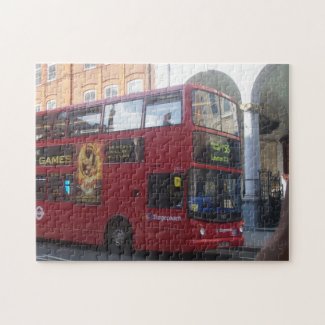
I started building a new lens last night. It got to be 1:30 in the morning and I still had several things to put in. I did go ahead and publish it even though I know I shouldn't have unfinished. I do hope to finish it today, although this is a busy day away from home for me (including my daughter being interviewed for the newspaper with the youth that went to England.) Hey! speaking of England and zazzle, I have been working some on making some of her photos from England into products. I have several more photos to get put into zazzle and then to make them into several different products. But, using one of the codes here in my lens, I'm sharing one of the products I made:
I could spend all day in nothing but squidoo with all the building and updating that I want to do! I do hope to see many of you link up this week :) Thanks so much for following along.